
App tool
Google autocomplete parser
We collect real phrasings from the Google search bar: live demand and the long tail absent from ordinary databases — free and with no API key.
Download the app
Windows, macOS, Linux · v0.2.0
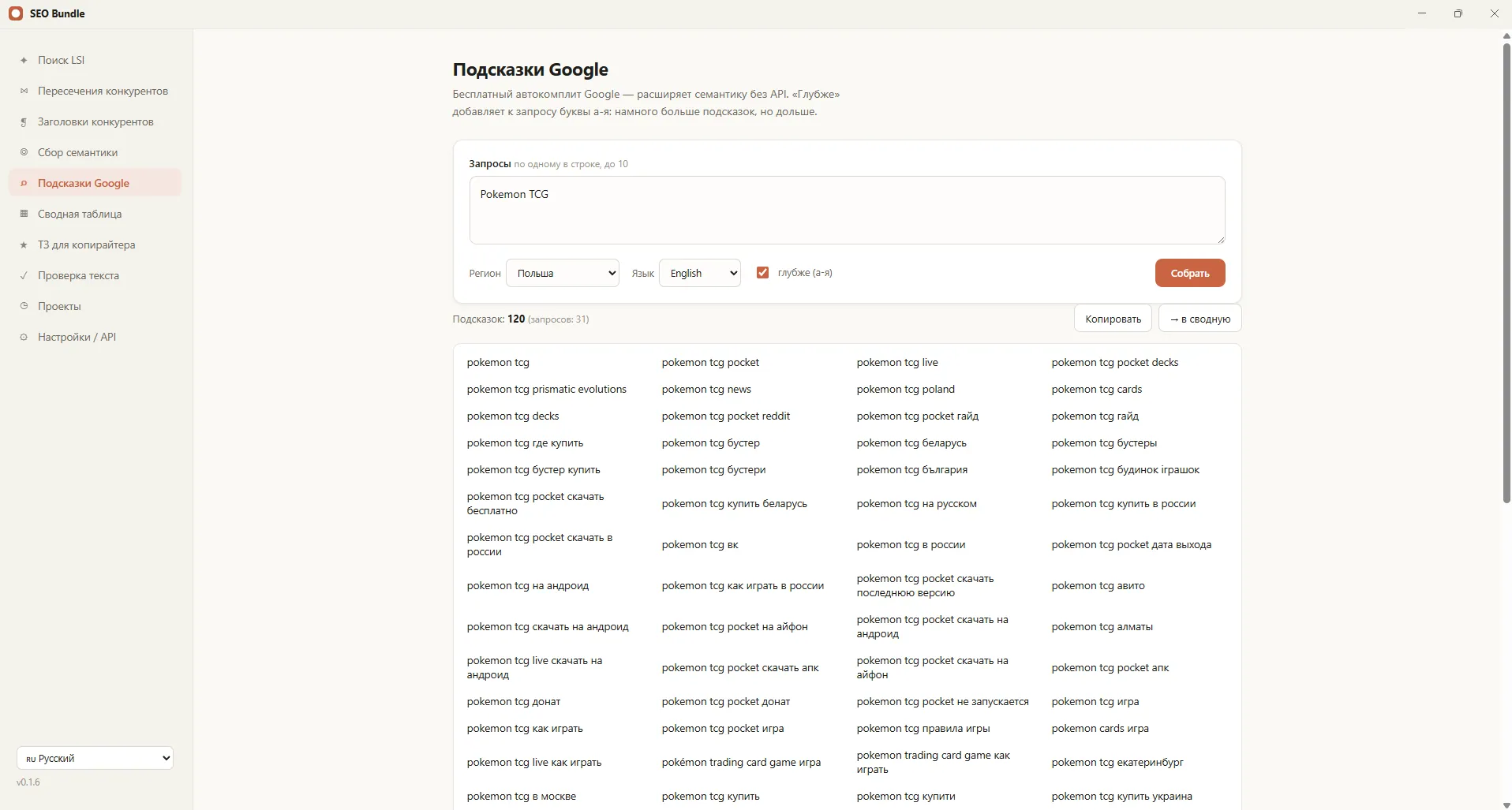
A Google autocomplete parser collects the real phrasings search suggests to users as they type a query. In the SEO Bundle app it is built in and free: suggestions are gathered for a query, expanded by the alphabet and assembled into a summary table. It is a fast way to find live demand that is absent from ordinary databases.
What search suggestions are
Search suggestions (autocomplete) are the options Google shows in the search bar as you type. They reflect how people really phrase queries right now, so they are valuable for semantics and content ideas.
The main advantage of Google suggestions is freshness. New phrasings appear in them earlier than in paid frequency databases, so a suggestion parser helps to catch demand at the start.
How the parser works in the app
Collecting search suggestions in SEO Bundle is simple and needs no API key.
- You enter a query or a list of queries;
- The app gathers Google suggestions for them;
- In "deeper" mode it expands the output by iterating through letters (A to Z);
- It groups the results and removes duplicates;
- It returns everything in a summary table for further work.
A stop button lets you halt a long collection at any moment, and the results can be sent to the shared semantic core right away.
Why suggestions are needed
Suggestions solve several tasks at once: they expand semantics, hint at live phrasings and give ideas for articles and landings. This is especially useful at the start of a project, when the core is only being collected.
- Expanding the semantic core with real queries;
- Finding the long tail and question phrasings;
- Ideas for content and a blog;
- Understanding the language of the audience.
Collected suggestions are convenient to use as input for keyword research and clustering.
Free and with no API key
Unlike many services, the suggestion parser in SEO Bundle works free and with no separate API. You do not pay per request and do not hit limits, and the data is gathered locally. This is convenient for regular expansion of semantics.
How to read autocomplete
Options from the search bar are not a random set but a reflection of frequent intents. By them you can see what concerns people: price, reviews, comparison, way of use. These intents hint at which sections and blocks to add to a site.
Question phrasings are especially useful: they become article topics and FAQ blocks that answer queries well and get into Google's quick answers.
Suggestions and the long tail
Most traffic in niches comes not from high-frequency queries but from the long tail — refined phrasings with low frequency one by one. Autocomplete is a simple way to gather this tail, because it shows the real refinements users type.
The fuller the tail is collected, the more pages and blocks you can create for specific intents without competing for overheated broad queries.
Regular expansion of semantics
Demand is not static: new products, seasons and trends appear. Periodic collection of search-bar options helps to notice new phrasings on time and add content for them ahead of competitors.
So the collection is convenient to repeat regularly, and the results to store in the shared core for further clustering.
How it differs from manual collection
Going through suggestions by letter by hand is hours of monotonous work. The app does it in minutes, expands by the alphabet automatically and removes duplicates at once. You get a structured list rather than a chaotic export from the search bar.
Part of SEO Bundle
Google suggestions are one of the sources of semantics in the app alongside Serpstat. Together with the LSI tool and keyword collection they form a full core, on the basis of which the copywriter brief is prepared. All tools are gathered in one window on the home page.
Suggestions for a content plan
The collected options are a ready basis for a content plan. By grouping them by topic, you see which articles and pages are needed and in what order. This turns scattered ideas into a systematic publishing schedule.
Question phrasings are especially valuable for a blog and a Q&A section: they directly answer what people search for and collect informational traffic well.
How to start
The Google autocomplete parser is one of the functions of the SEO Bundle desktop app. Download the app and gather suggestions for your first query in a couple of minutes. For questions about adoption in a team, write to us on Telegram.
Frequently asked questions
What are Google search suggestions?
They are query options Google shows in the search bar as you type. They reflect how users really phrase queries and are useful for expanding the semantics of a project.
Is the suggestion parser free?
Yes, in SEO Bundle the collection of Google suggestions works free and with no API key. There are no limits or fees per request, and the data is gathered locally on your computer.
How are suggestions better than frequency databases?
Suggestions are fresher: new phrasings appear in them earlier than in paid databases. It is better to use both sources together for the completeness and accuracy of semantics.
Can suggestions be expanded by letter?
Yes, in "deeper" mode the app automatically iterates options by the alphabet and gathers more of the long tail. A long collection can be stopped with a button at any moment.