
App tool
Serpstat keyword collection
We pull keys, frequency and competitors straight from Serpstat via API into one summary table — all semantics in one window, with no manual copying.
Download the app
Windows, macOS, Linux · v0.2.0
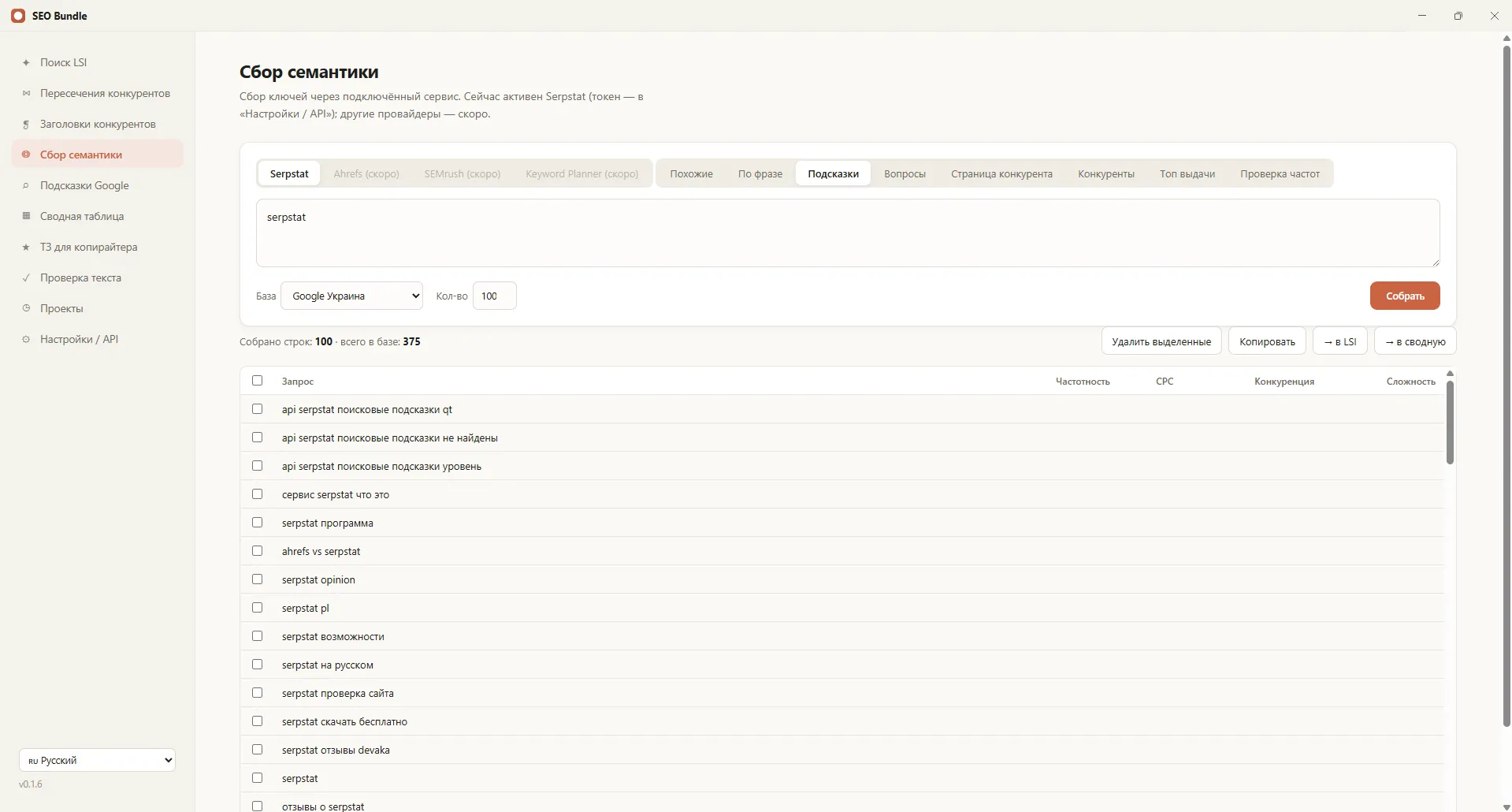
Serpstat keyword collection is getting keys, frequency and competitors straight from the Serpstat database via API. In the SEO Bundle app this is built in: you enter a token and a query, and the app pulls related keys, suggestions, competitor queries and the results top into one summary table. All semantics are gathered in one window, with no manual copying from the web interface.
What Serpstat gives
Serpstat is one of the strongest databases for keys and frequency for the markets of Ukraine and the CIS. Through it you can see real demand: how many times a query is searched, which related phrases exist and which competitors rank. This is the foundation for a semantic core.
SEO Bundle accesses Serpstat via API, so Serpstat keywords land straight into the app's working table rather than staying in a separate service. This removes the routine of moving data between tools.
How the app collects semantics
Serpstat parsing in SEO Bundle uses several methods of the database and brings the result together.
- Related queries for your key;
- All queries containing the phrase;
- Live search suggestions;
- Keys a competitor's page ranks for;
- The results top and question queries for the FAQ.
Each source is tagged, so you can see where a query came from and easily filter out the excess.
What goes into the summary table
All collected data is put into a single table with frequency and grouping. It is convenient to work with: filter, clean, move phrases between groups and form the core.
- Queries with frequency from Serpstat;
- The source of each query (related, suggestions, competitors);
- Grouping and filters by column;
- Readiness for clustering and passing into the brief.
Why collect everything through one token
One Serpstat token closes the main data collection: frequency, competitors and related queries. This is cheaper and simpler than keeping several subscriptions, and the limits are spent transparently. A semantic core is collected in one pass, with no switching between services.
Additionally the app uses free Google suggestions, so part of the data is gathered with no limit spend at all.
Where the frequency numbers come from
The database stores how many times a query is searched in the chosen region. These numbers show real demand: what is popular and what is almost never searched. Without frequency a core turns into a list with no priorities, where it is unclear what to begin with.
The app pulls frequency right next to each query, so keys can be ranked by importance directly in the table.
Competitor reconnaissance through the database
Besides keys, the service shows which queries rival sites rank for. This helps to see others' demand and find queries you are missing. Data about rivals goes into the same table and is compared with yours.
So one source closes both keyword collection and market reconnaissance, with no switching between services.
Which tasks it suits
Data collection through the database is needed at the start of any project and during regular expansion of the core. A store gets catalog semantics, a service site queries for services and regions, a blog article topics. Anywhere real demand is needed rather than guesses.
Regular expansion of the core
Semantics is not static: new products, services and phrasings appear. Periodic data collection helps to notice new demand on time and add pages for it ahead of rivals. The app stores projects, so it is convenient to return to the core and supplement it.
This approach turns a one-off collection into a managed process: the core grows with the business rather than aging half a year after launch.
Part of the semantic core
Serpstat data is the main source for keyword research. Together with suggestions and competitor overlaps it forms a full picture of demand, on the basis of which the copywriter brief is prepared. So keyword collection passes straight into content work.
Negative words and cleaning
Raw data always contains excess: other brands, irrelevant cities, junk phrases. Right in the table it is convenient to filter them out and gather a list of negative words. A clean core saves budget both on organic and on future paid ads.
Filters by column and grouping help to quickly separate target keys from noise, without exporting the data to outside tables.
How it is more convenient than the web interface
In the Serpstat web version data has to be exported in parts and merged by hand. The app does it automatically: several methods in one click, a single table, filters and grouping. You save time and do not lose data when moving between services, while the whole semantics collection runs in one window of the app.
How to start
Serpstat keyword collection is one of the functions of the SEO Bundle desktop app. Download the app on the home page, add your Serpstat token and collect a core for your first query. For questions about adoption in a team, write to us on Telegram.
Frequently asked questions
Is a Serpstat subscription needed?
Yes, a Serpstat token is needed for collection via API. Part of the data the app gathers free through Google suggestions, but frequency and competitors are given precisely by Serpstat under your plan.
What data does the app collect?
Related queries, phrases, suggestions, competitor keys, the results top and questions. Everything is brought into one table with frequency and the source of each query for convenient work.
How is it better than the Serpstat web version?
The app combines several methods in one pass and gathers data into a single table with filters. There is no need to export and merge reports by hand across several tabs.
Are Serpstat limits spent?
Yes, API requests spend the limits of your plan, and the spend is visible transparently. Google suggestions are free and spend no limits, so part of the collection is free of charge.